
Approval workflows shaped to your process
Students submit internships, jobs, volunteering and courses for credit, and each submission moves through approval flows the career center designs itself.
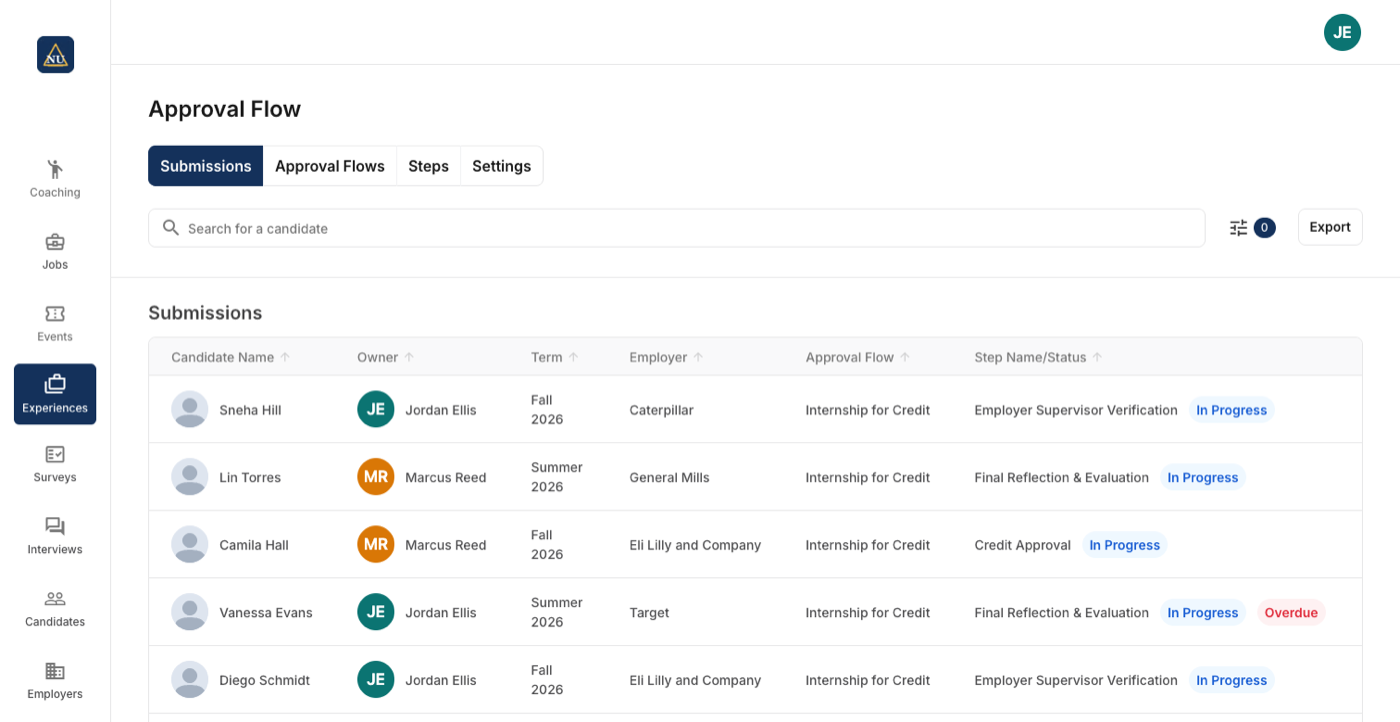
Steps you define, assembled into flows
A step is an action or a review, with an actor and the questions or prompts it needs. Steps combine into approval flows, and flows can share steps.
- Several flows for different student groups, experience types or times of year
- External reviewer steps for supervisors outside the career center
- Show or hide a flow from students, for example by term
- Institution terms, deadlines and withdrawal rules
Approve, send back, or finish a step for the student
Submissions sit in a table and open to a details page with documents, notes and the step history.
- Approve, or send back for rework
- Preview or download the documents
- Automated emails with merge fields when a step is reached or completed
- Past submissions keep the steps that existed when they were submitted
Set once, at the level it belongs to
Each career center on a campus runs its own experiential learning; what the institution shares is set once for all of them.
| Setting | Set where |
|---|---|
| Steps: an action or a review; the actor (student, career center, external reviewer, or another role); instructions, custom questions, resources and event types shown; emails when a step is reached or completed | Per career center |
| Approval flows: which steps, in which order, and whether the flow is visible to students right now | Per career center |
| A default owner for new submissions, or none so the team picks them up | In the module settings |
| Whether students give an end date, and whether it is required | In the module settings |
| Whether students may withdraw a submission themselves | In the module settings |
| Institution terms that submissions are filed against | In the module settings |
Experiential Learning next to Handshake, Symplicity and 12twenty
Approval flows the career center designs: steps, actors, external reviewers, automated emails.
| How it works there | |
|---|---|
| Handshake | Experiences submitted by students, approved by the school and often the employer's supervisor by email, with mid and final evaluations. Source Full comparison |
| Symplicity | Internship approval, tracking, evaluations and agreements; an experiential learning module with forms, approval workflows and mid and final evaluations. Source Full comparison |
| 12twenty | Customizable approval workflows for jobs and academic credit, an approval-history log, forms by school, major and experience type, and an hours log. Source Full comparison |
Statements about other products come from their own sites, linked in each row.
New in Experiential Learning this fall








What Experiential Learning does not make you do
The flow is yours to design
Steps are the pieces: what is asked, of whom, and what happens next. Flows are assembled from them, several flows for several programs, and flows share steps.
Reviewers do not need accounts
An external reviewer step goes to a named contact, an employer supervisor or a faculty member, who reviews from the email they receive.
Past submissions do not change
Editing or deleting a step in a flow applies to submissions from then on. Existing submissions keep every step they had when they were submitted.
Questions people ask about Experiential Learning
Works with
See Experiential Learning on your career center
A 30-minute walkthrough with the team that builds it.
