
Career fairs and every other event, faster and simpler
Create career fairs and other events, take employer and student registrations, approve them and invoice employers, all in one place.
Packages, add-ons and pricing, set once
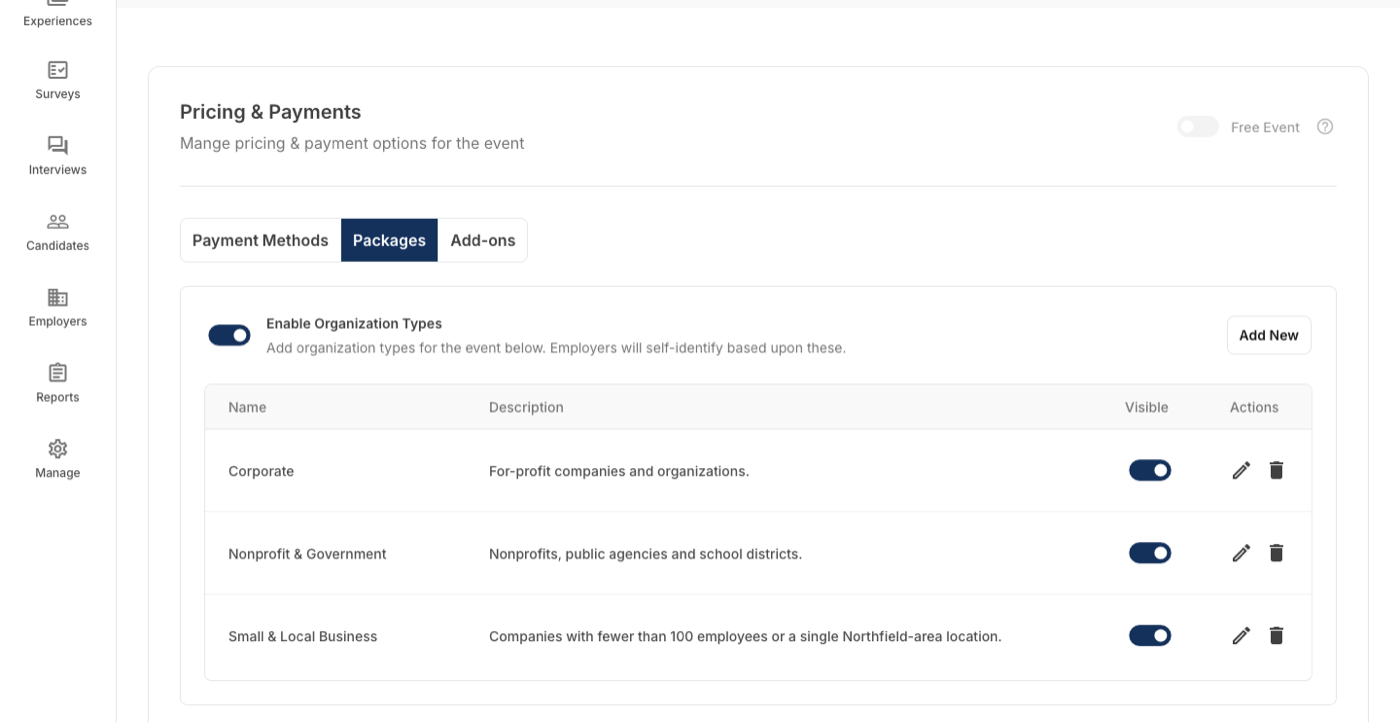
Each event carries its own employer packages, add-ons and prices, and next year's fair starts as a copy of this one.
- Packages with attendee and table limits
- Add-ons with a rate and quantity
- Pricing by organization type, early-bird rates, free events
- Custom questions for employers and for students
Employers register; you approve
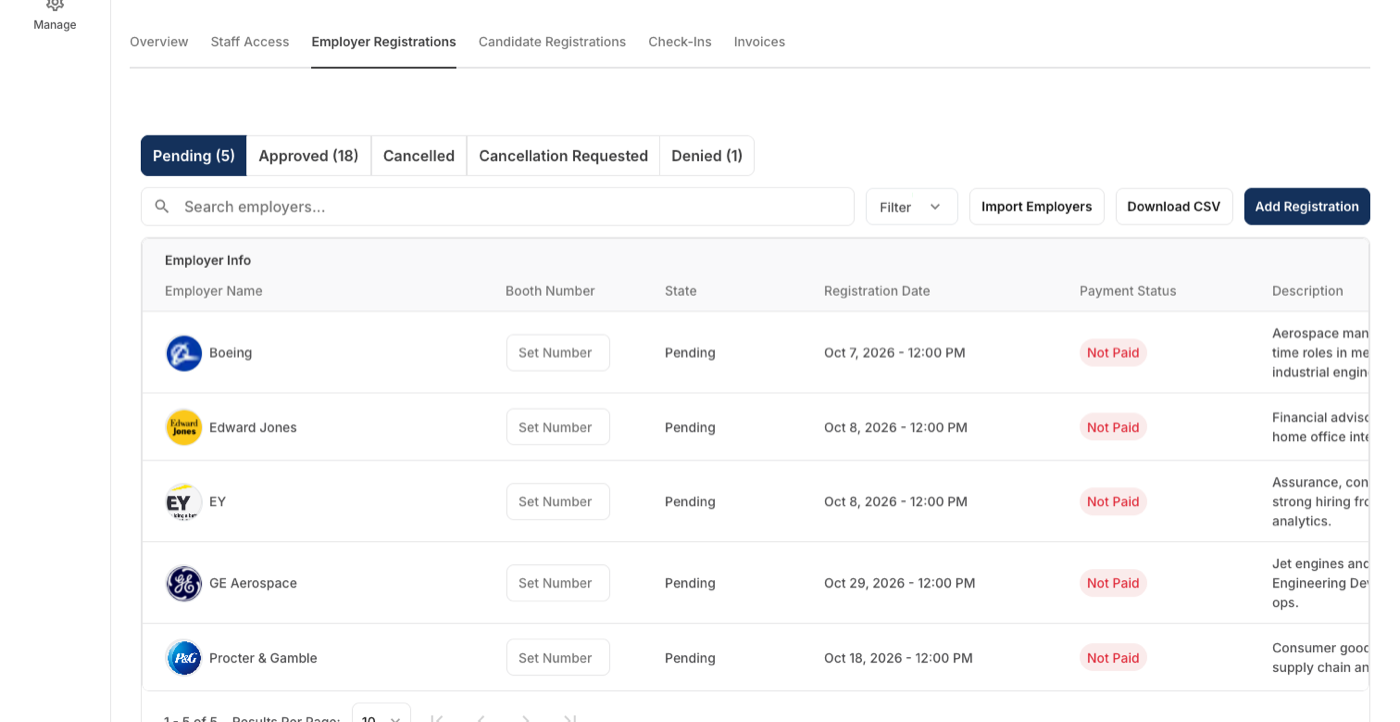
Registrations arrive with the employer's answers, and staff approve, assign booth numbers and edit representatives from one list.
- Approved, pending, cancelled and denied in their own tabs
- Booth numbers and representative names on each registration
- Students register too, with their own questions
- Automated emails on registration and approval
The fair's finances on one screen
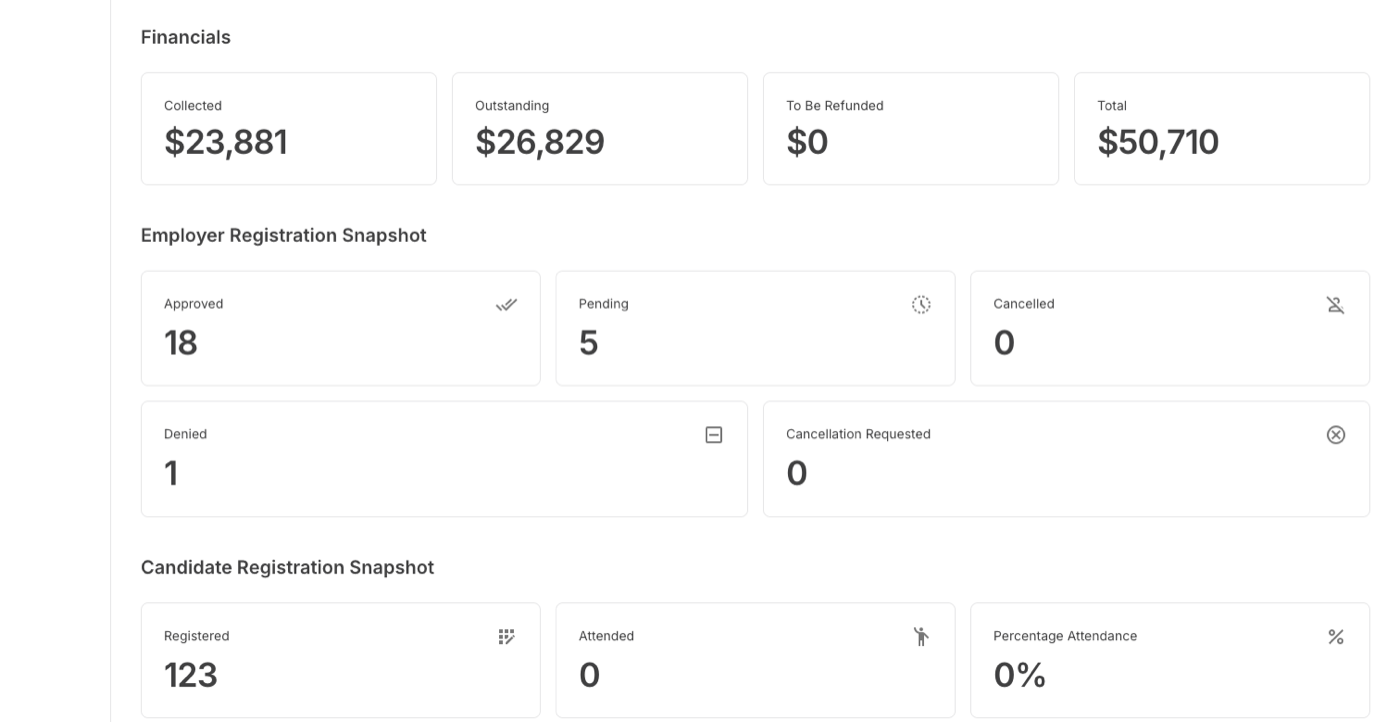
Every event's overview shows what has been collected, what is outstanding and what is due for refund, next to the registration counts and the session, package and add-on breakdown. No spreadsheet beside the system.
- Collected, outstanding, to be refunded and total, per event
- An invoice per registration; payment by card, Stripe, check or TouchNet
- Discounts as a negative line item, with an invoice preview
- Packages and add-ons sold per session, with what remains
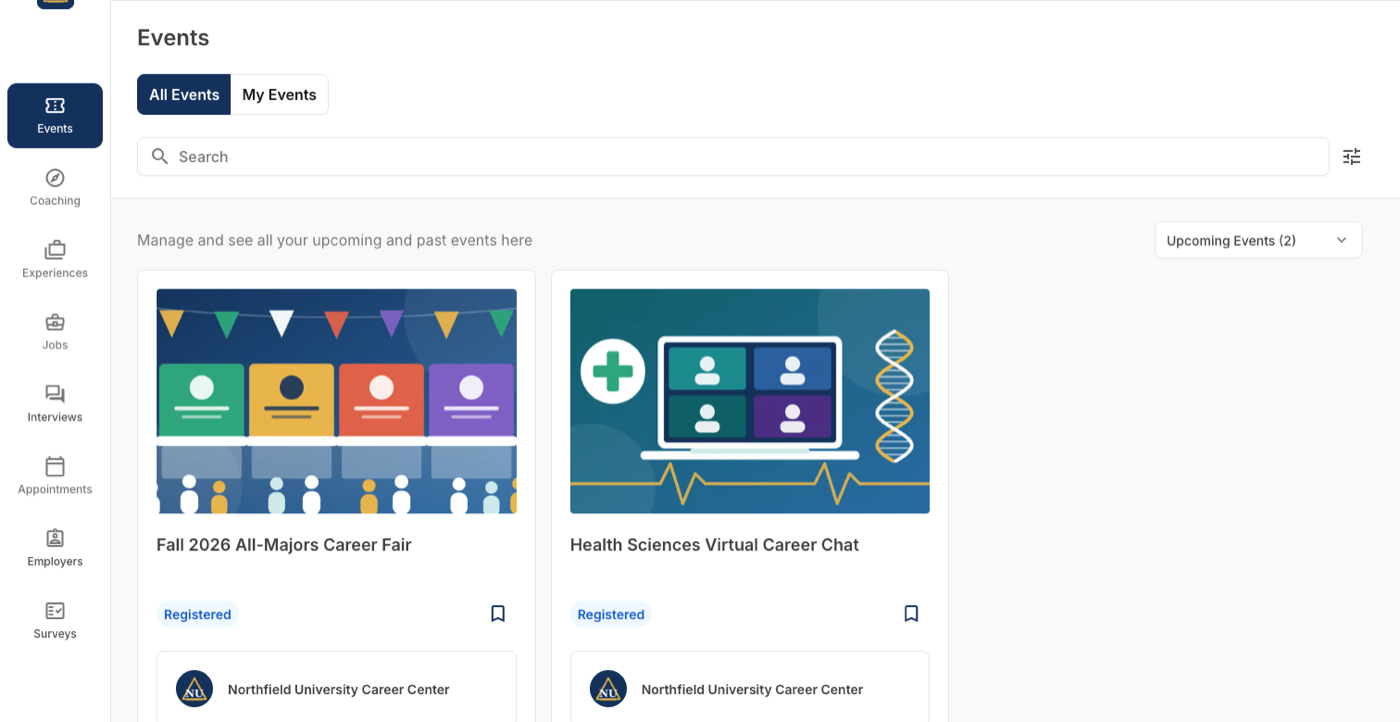
The fair as students see it
A student's events page shows each fair and event with its banner, dates, format and location, a register button, and the career center it belongs to.
- Register from the card, or see details first
- In-person and virtual events side by side
- Registration status on the card once they are in
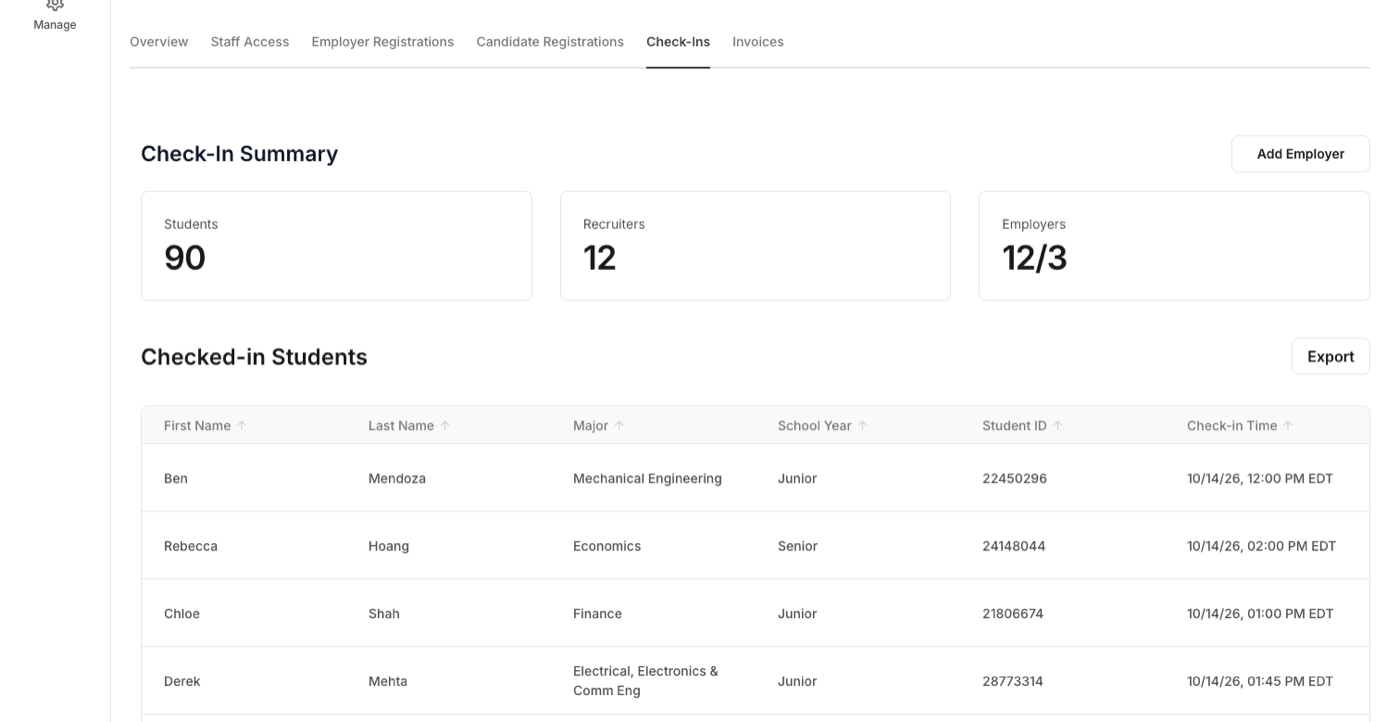
Check-in and badges from an iPad
Students scan their ID or tap a card, recruiters check in and get badges too, and the kiosk keeps working when the Wi-Fi does not. Check-in reads the fair's registrations and marks each registered student as attended.
- Default, Speed and Tap-and-Go modes
- Check-ins export from a web dashboard
- Runs on an iPad with a Brother label printer
Set once, at the level it belongs to
Each career center on a campus runs its own event management; what the institution shares is set once for all of them.
| Setting | Set where |
|---|---|
| Event type, single or multi-session, and whether employers, candidates or both register | Per event |
| Packages: name, description, recruiter limit, tables and their dimensions, and which sessions each is sold for | Per event |
| Prices per package by organization type, early-bird rates with a cut-off date, and the quantity available | Per event |
| Organization types employers choose from when they register | Per event |
| Add-ons: name, rate, quantity available and the maximum per registration | Per event |
| Payment methods offered on the event | Per event, from the methods set up for the career center |
| Questions for employers and for candidates, and the automated emails | Per event |
| Who hosts the event and who is invited to manage it | Per career center |
| Branding, majors, school years, position types, work authorizations, degree levels, single sign-on | Per institution, once for every career center |
Event Management next to Handshake, Symplicity and 12twenty
Packages, add-ons, pricing by organization type, booth numbers, and an invoice per registration, paid by card, Stripe, check or TouchNet.
| How it works there | |
|---|---|
| Handshake | Schools invoice fair registrations; employers pay by card through the host school's Stripe account, or by a manual method the school sets, and staff can record manual payments and refunds. Source Full comparison |
| Symplicity | Booth maps and one-click auto-assignment of confirmed employers to booths (CSM 9.8); a career fair invoice payer workflow that lets someone other than the registrant log in and pay the invoice (CSM 9.1). Source Full comparison |
| 12twenty | Registration with custom forms, payment collection, early-bird windows, 1:1 and general-admission slots. Invoicing and booth management: not found on its site. Source Full comparison |
Statements about other products come from their own sites, linked in each row.
New in Event Management this fall








Event Management, in a career center's words
“One of the big wins from the beginning has been the badging system. It works really well, it impresses students and the rest of the university, and we've been able to use it for other events.”
“We had a great event. Everything worked beautifully.”
A week after the fall career fair, run on Career Forge with iPad check-in.
“It's so much easier to write an email to students.”
What Event Management does not make you do
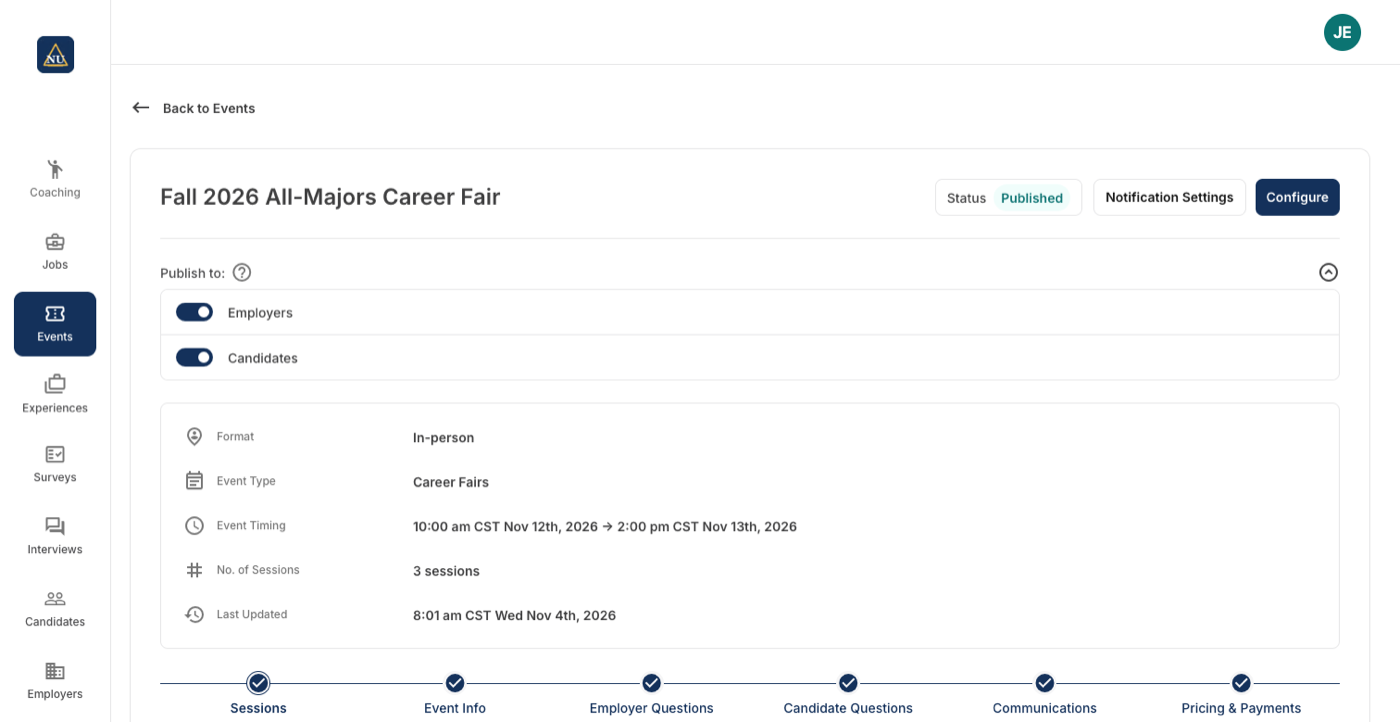
Registration and publishing are two switches
Open registration before the event is visible, or show the event before anyone can register. Each side, employers and candidates, is published on its own.
Every paid registration is an invoice
Collected, outstanding, to be refunded and total are computed from the invoices and the payments recorded against them. The overview is the ledger, not a summary of it.
A free event stays simple
Mark an event free and payment methods, prices and invoices disappear from it. Everything else about registration stays.
Questions people ask about Event Management
Works with
See Event Management on your career center
A 30-minute walkthrough with the team that builds it.
